Strokes: achievements while programming!
Dit is een oudere post, nog in het Engels geschreven.
Ok, so I’ve already hinted about this several posts before: an actual implementation of achievements-based programming in Visual Studio is being made as we speak. In this post I will humbly and proudly present the Strokes program that is rapidly evolving into something I’m eager to use in my own classes. Humbly because the work Jonas Swiatek has done is, in my opinion nearly epic, for each component in the project that I understand, there’s about 3 others that I don’t. Proudly because, it being a googlecode project, I in fact have made several small contributions to the project, not in the least dozens of mails in which I describe my ultimate wishes on how the program should behave.
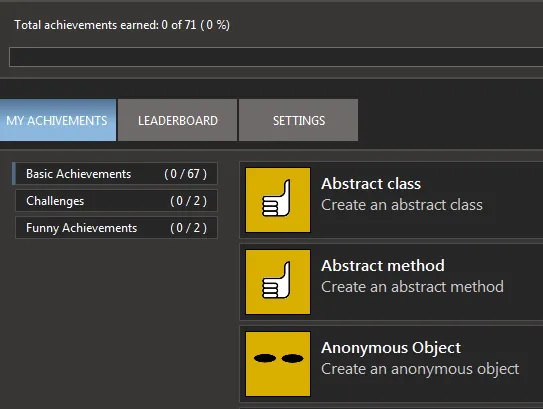
Explaining how the whole shebang works internally is not what this post will be about, instead, I’d like to simply throw around some pretty screenshots and show of the program the way the end-user might see it. Since this program was written to be as extendable as possible, in the end of this post I’ll give a brief overview on how others can use the Strokes-code to write new achievements.
Before reading on, I’d like to point out this project is still a work-in-progress. So if you are a) disappointed or b) excited, there’s 2 things you can do: you can help us out and contribute in any which way you see fit (provide ideas for challenges and achievements, contribute code or art, give basic feedback) or you can simply nod with your head sympathetically, leave and do other things *grin*.
If you want to see how it all works or make some contributions, all information can be found here: https://github.com/jonasswiatek/strokes. Make sure you read the wiki on how to setup your Visual Studio if you wish to test the current version of the project. And of course, don’t hesitate to contact us.
Update (24/08): An early beta can be downloaded of the strokes program so people can test the application themselves. Let us know what you think of it. Download here.
How it works
The Strokes program is basically a Visual Studio 2010 extension (.vsix) that users can simply install without too much hassle. Once this is done, users will see a new menu-item in the Tools-section of Visual Studio:

Voila, the Strokes project! Clicking this item will pop up a summary page where the user can track his or hers current progress. We tried to mimic the Steam-based achievements pages so don’t sue us for it:
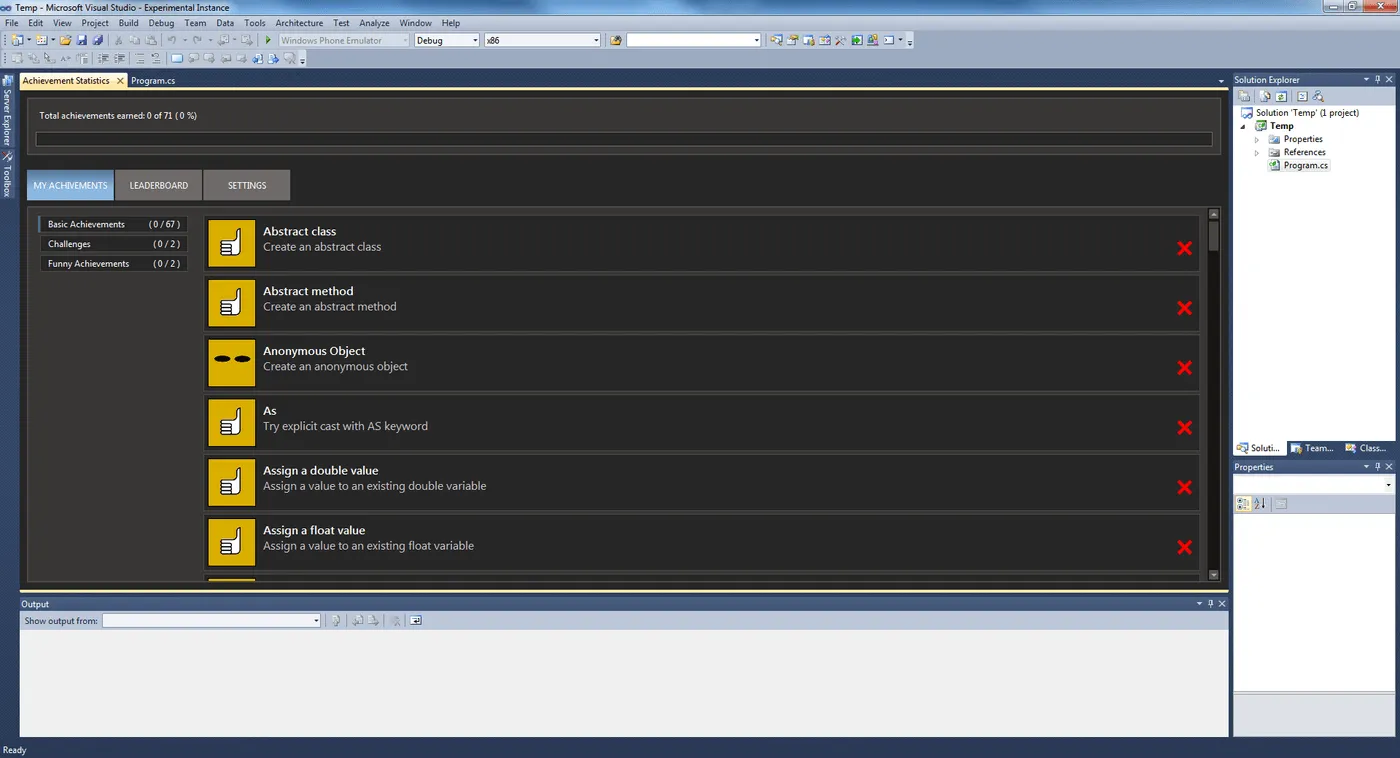
Click to enlarge
Our achievements are grouped in several categories and users can see which achievements were…uhm …achieved, and which aren’t. For now, we basically have 2 types of achievements: simple achievements and challenges, but more on those later. At the moment, this is the only screen that shows any interesting stuff. Ultimately the project might go ‘in the cloud’ and allow comparison of users and their achievements with leaderboards and other fun stuff.
To unlock achievements, the user simply starts programming and each time a unlockable achievement code construct is written, the achievement is reached. Once the user builds his program successfully, the Strokes program will kick in and check whether any new achievements are in fact achieved. (in the future, I’d love to be able to have a hierarchy of achievements: preventing users from accidentally unlocking achievements they aren’t even aware of at the time: imagine a newbie student writing his first program and immediately unlocking the ‘make a class’ achievement because basically all programs in C# are a class…)
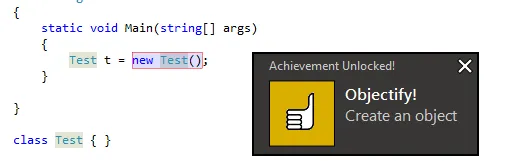
So suppose the user writes the following, not so, meaningful code:
class Program { static void Main(string[] args) { Test t= new Test(); } } class Test{}
Once the user builds this program, the following window pop ups in the lower right corner:
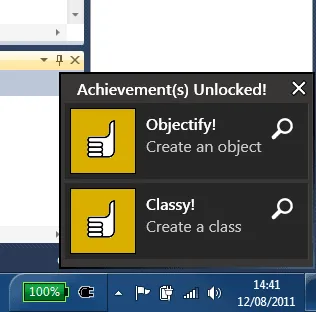
Clicking the magnifying icon will highlight the code that actually triggered the achievement, allowing students/users to learn from what they did to earn the achievement:
If the user should now go to his achievement summary page, he’d see that two achievements were in fact unlocked. At the moment we have around 70 achievements implemented from a list of about 100 achievements. Currently the achievement are very straight-forward ones, mainly meant to show how Strokes works and to be used by beginning programmers. However, the Strokes architecture easily allows to have more complex achievements, more on that later.
Challenges
Besides basic achievements (and some silly achievements such as writing an infinite loop), the Strokes project also supports “Challenges”. Just like the “Pex for Fun” challenges, the Strokes challenges are programming tasks where the user has to write a certain class according to the challenge description. Basically, the user needs to implement the interface of the given challenge and the Strokes program will then test whether the class in fact works as was intended.
As a proof-of-concept, two challenges were defined:
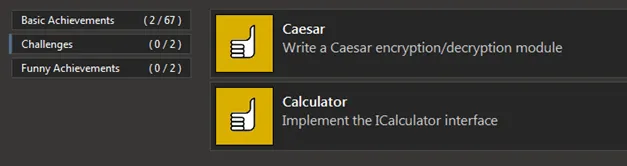
For example with the Calculator challenge, the user basically has to implement the following interface which is defined in the Strokes.Challenges.Student.dll:
public interface ICalculator { int Add(int a, int b); int Subtract(int a, int b); int Multiply(int a, int b); float Divide(int a, int b); }
The Strokes program will detect if code is being written against the correct interface and then tests whether the class works as it should be. If it is, the challenge is unlocked.
Extending the program with achievements
Easily extending the Strokes program was one of the main goals, as such, developers who wish to write their own achievements or challenges can do so fairly fast. Allow me to show you the code needed to add an achievement that detects if a user has written a while loop:
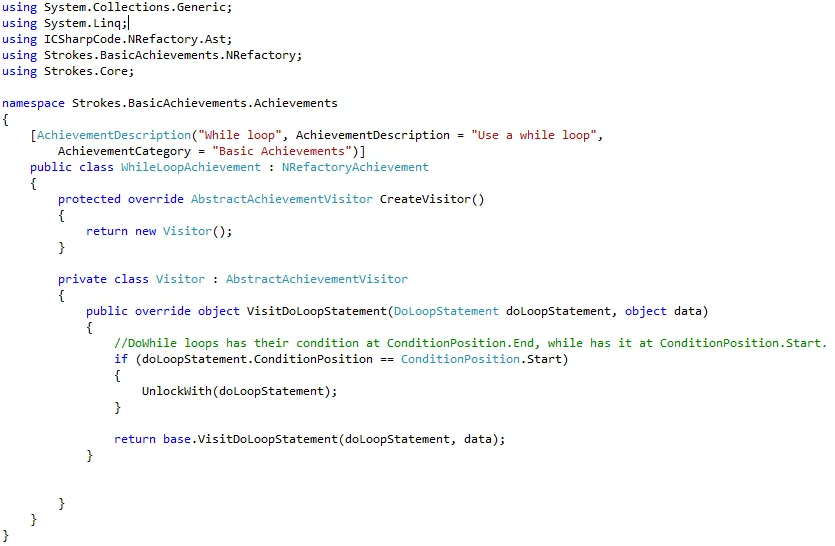
Click to enlarge
As a developer, you need to write a class that inherits from the NRefactoryAchievement class and you’re good to go. You then decorate the class with at least 3 attributes containing the Title, Description and Category of the achievement. A 4th attribute can be added that contains the URI of the icon the achievement should use in the UI.
Next up, some NRefactory magic (NRefactory is part of the SharpDevelop project which is an opensource C# IDE project, more info) is used allow programmers to simply add code that does all the work J
Using the visitor design pattern, you need to override those methods that visit the code construct you are interested in. There’s about 200 things that NRefactory detects in code being compiled, so you ‘simply’ need to know which one(s) you need for a given achievements. For users, like me, not familiar with NRefactory, simply checking what methods can be overridden is an eye-opener and should get you started.
Once you detected where the achievements is unlocked, you need to call the UnlockWith() method an pass the statement that contains the code that unlocks it. This will prompt the Strokes program to award the achievement to the user.
Extending the program with challenges
Writing challenges is equally straightforward. Three steps need to be done:
1° Define a new achievement class, but now one that inherits from the challenge class:
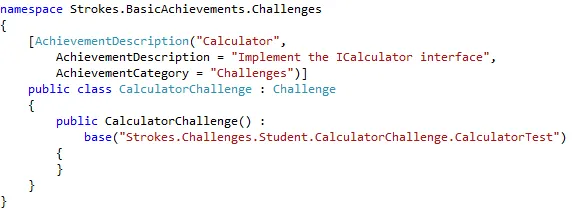
The Strokes.Challenges.Student.CalculatorTest is the class in Strokes.Challenges.Student that can test the challenge implementation.
2° Write any interfaces the user needs to implement, such as the previously shown ICalculator class.
3° Write the CalculatorTest class, that inherits from the AbstractChallengeTester class, which tests if the challenge works as needed, if it does, true is returned:
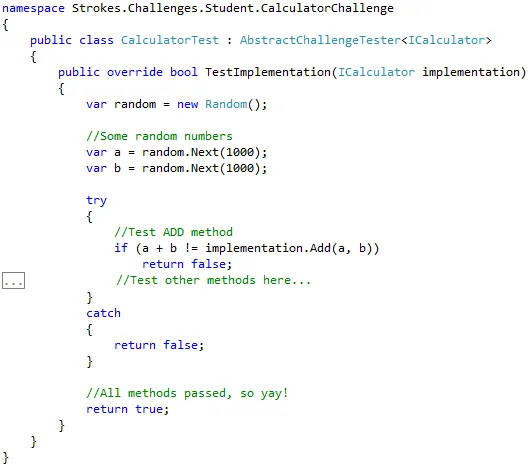
Where achievements are, just as in games, a fun extra aspect of a learning process (and way of encouraging games/students to explore more of the game) , the challenges are in fact the real ‘learning aspect’. By introducing challenges as a teacher you can have the equivalent of boss fights. Only if the challenge is completed will the user be able to advance (and e.g. have new achievements and challenges to unlock). Compare it to a mor fun ‘practical test’ where not the coding style itself is important, but only the actual implementation. Make note that challenges in no way should be used as a substitute for real tests (nothing prevents users from ‘cheating’ in challenges by simply hardcoding those parts that are hard to write in a logical manner).
In conclusion
Okay, so that’s what the Strokes project is about. If you’re stoked and excited as I am about this project, feel free to contact us for more information. If all goes well I’m going to do a first trial test of the project with my first year student this autumn. I’m really looking forward to how the students will reacts to this.
We are still developing the project so new achievements and challenges will see the daylight the coming weeks/months. I’ll soon put up a list of the current achievements that are implemented in the project so others can be inspired by this and feed us new achievement ideas.
Update remark: the original conceptual ideas of this program are discussed in earlier posts [Part1, Part 2, Part 3].